Follow Up Software for Small Business

Stay on top of leads, customers, and important conversations with simple follow-up software. Schedule follow-ups, get reminders, and keep your customer relationships organized with FollowUpHQ.

14-day free trial. No credit card required.

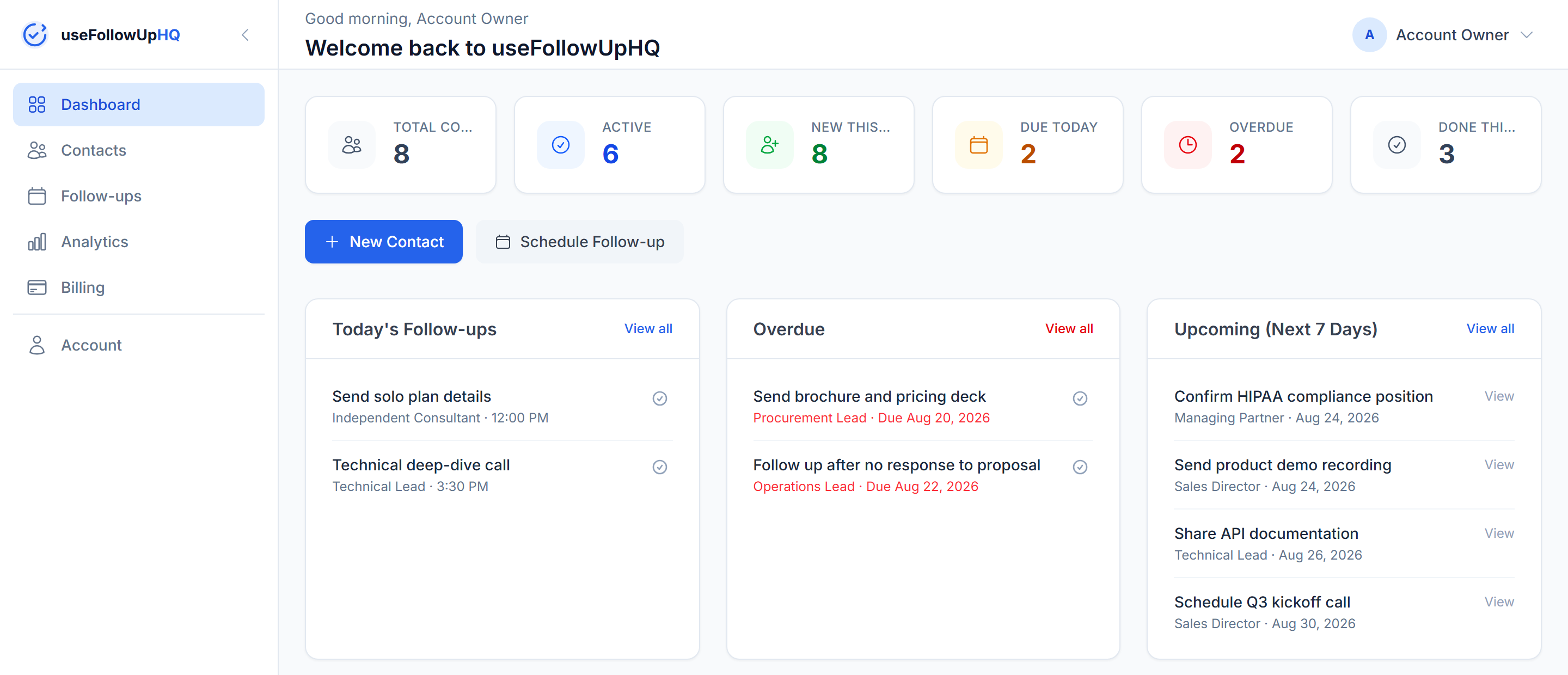
FollowUpHQ follow-up software dashboard showing contacts, today's follow-ups, and overdue items

Don't Let Important Follow-Ups Slip Through the Cracks

Important opportunities can slip away simply because a follow-up was forgotten. It's a familiar pattern:

  • You meant to follow up, but it slipped your mind.
  • A promising lead went quiet, and you never circled back.
  • You need to check in with an existing customer, but it's easy to forget.
  • Follow-ups are scattered across notes, spreadsheets, or memory, with nothing tying them together.
  • You know roughly when you need to follow up, but you don't have a reliable system that reminds you.

Follow-up software exists to close that gap — a place where the next action lives, with a reminder attached to it.

What Is Follow-Up Software?

Follow-up software helps you organize and schedule the next action you need to take with a lead, prospect, customer, or client. Instead of a follow-up living in your head, a sticky note, or a spreadsheet row, it becomes a scheduled item tied to a contact — with a reminder that reaches you when it's due.

In practice, that means being able to:

  • record a contact's details in one place
  • schedule a follow-up for a specific date, or a specific date and time
  • receive a reminder before the follow-up is due
  • track whether a follow-up is still pending, completed, or cancelled
  • keep relevant contact information together with the follow-up itself
  • see what's upcoming and what's overdue at a glance

That's the specific problem FollowUpHQ is built to solve: giving people a reliable system for follow-up scheduling and reminders without the complexity of a full sales platform.

A Simple Follow-Up Workflow

01

Add the Contact

Store name, company, email, phone, source, notes, and status for the person you need to follow up with.

02

Schedule the Follow-Up

Create a follow-up with a title, description, due date, and an optional specific time.

03

Get Reminded

You get an email reminder before it's due — timed follow-ups one hour before, date-only ones at 9:00 AM.

04

Complete the Follow-Up

Mark it completed once you've made contact, or cancel it if it's no longer needed.

05

Keep the Relationship Organized

Update the contact's status and see a simple activity timeline for what's happened so far.

Never Lose Track of the Next Follow-Up

A scheduled follow-up is only useful if something reminds you about it. Every follow-up you schedule in FollowUpHQ can trigger a reminder email sent to you — one hour before a timed follow-up, or at 9:00 AM local time for a follow-up scheduled for a date without a specific time. The reminder goes to you, not to the contact.

For the full breakdown of exactly when reminders fire, the two-hour scheduling rule, and how timezones and daylight saving are handled, see the follow-up reminder tool page.

Use Follow-Up Software for Different Customer Relationships

The same follow-up and reminder workflow applies whatever you're following up about.

Lead Follow-Up

Schedule a follow-up so a potential customer doesn't go cold after the first conversation.

Sales Follow-Up

Set the next action after a sales conversation or opportunity, so it has a clear next step instead of trailing off.

Customer Follow-Up

Schedule a check-in with an existing customer, so the relationship keeps getting attention after the sale.

Client Follow-Up

Keep scheduled follow-ups with clients organized alongside their contact details and notes.

Email Follow-Up

Schedule a reminder for an email-related follow-up you need to send. FollowUpHQ reminds you to act — it doesn't send automated email sequences on its own.

Who Can Use Follow-Up Software?

FollowUpHQ fits small business owners, freelancers, consultants, sales professionals, agencies, contractors, and service businesses — anyone managing their own contacts and follow-ups. It's a single-user tool: built around one person staying on top of their own list, not a shared team workflow.

Follow-Up Software vs. Spreadsheets

A spreadsheet can technically hold contacts and follow-up dates. The difference is what happens automatically versus what you have to remember to do yourself:

FollowUpHQSpreadsheet
Contact information✓✓
Follow-up scheduling✓Manual
Follow-up reminders✓Manual
Contact status tracking✓Manual
Upcoming follow-ups✓Manual
Overdue follow-ups✓Manual
Activity timeline✓Manual
Follow-up dashboard✓—

Follow-Up Software vs. a Traditional CRM

A CRM can manage many parts of the customer relationship — pipelines, reporting, team collaboration, automation. Follow-up software focuses on one thing: making sure the next action doesn't get forgotten. The two aren't mutually exclusive categories; a good follow-up tool is really a piece of what a CRM does, done well on its own.

FollowUpHQ combines contact management, contact status tracking, follow-up scheduling, reminders, a dashboard, and analytics — the follow-up-focused core of a CRM, without custom pipeline stages or team features layered on top. If you're deciding whether that's enough or whether you need a full CRM, see simple CRM for small businesses.

FollowUpHQ Follow-Up Software Features

  • Contact management — name, company, email, phone, source and notes for every contact.
  • Lead/contact status tracking — New, Contacted, Qualified, Won or Lost.
  • Follow-up scheduling — a title, description, due date, and optional due time.
  • Follow-up reminders — an email reminder one hour before a timed follow-up, or at 9:00 AM local time for a date-only one.
  • Customer activity timeline — when a contact was added and every follow-up scheduled, completed or cancelled.
  • Dashboard — today's follow-ups, upcoming, overdue, recent contacts, and recent activity.
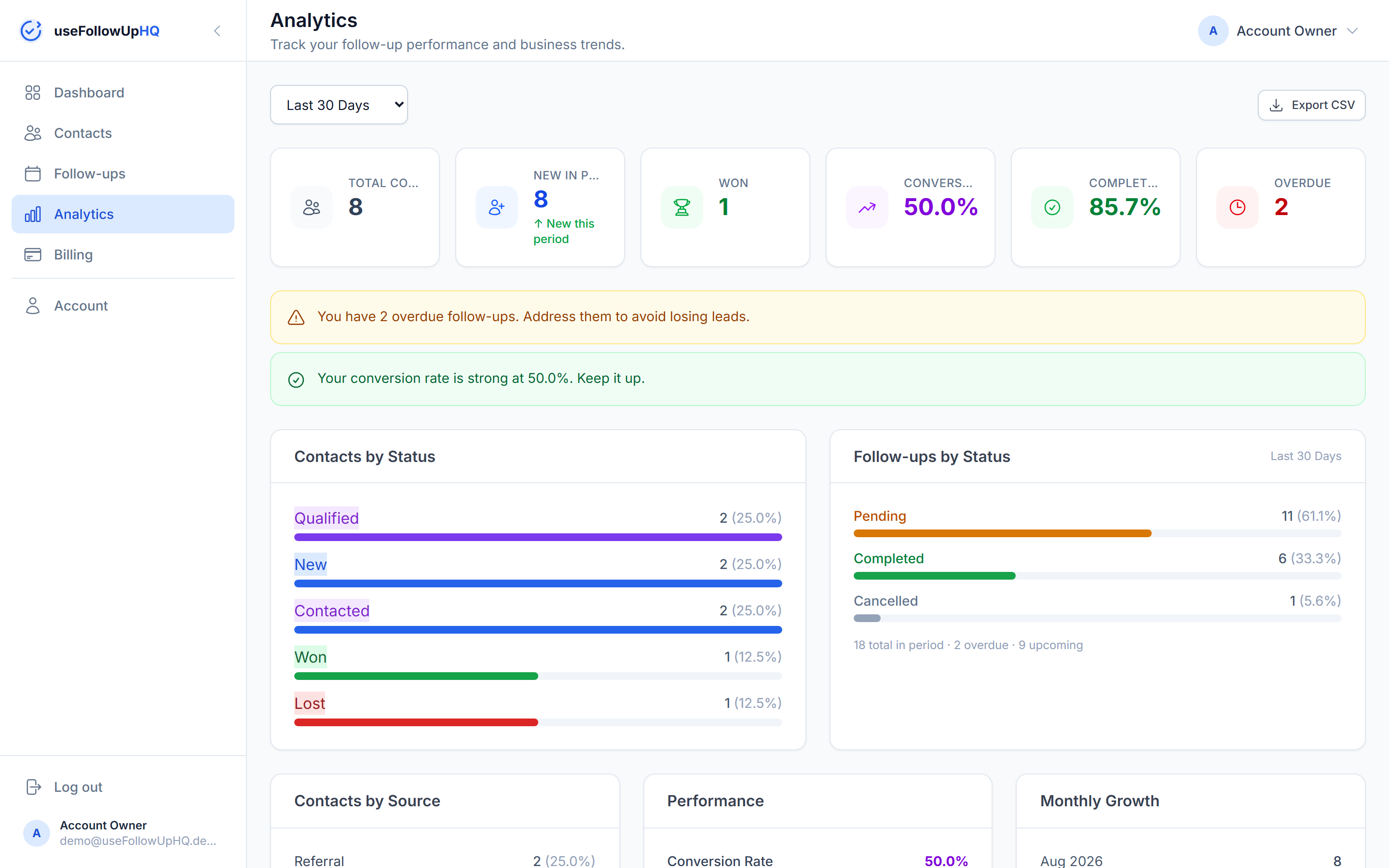
  • Follow-up analytics — conversion rate, completion rate, contacts by status and source, and monthly growth.
  • CSV export for follow-up data — export your follow-up activity for a chosen date range.
FollowUpHQ follow-up analytics showing conversion rate and contacts by status

Frequently Asked Questions

What is follow-up software?

Follow-up software is a tool that helps you organize and schedule the next action you need to take with a lead, prospect, customer or client — instead of relying on memory, sticky notes, or a spreadsheet you have to remember to check.

What is the best way to keep track of follow-ups?

Keeping contacts, scheduled follow-ups, statuses, and reminders in one place tends to work better than splitting them across notes, a calendar, and memory — a reminder attached directly to the contact and the reason for the follow-up is much harder to lose track of.

Is follow-up software useful for small businesses?

For a small business or solo operator, a dedicated follow-up workflow means the next step for every lead or customer is visible in one place, with a reminder that fires automatically, rather than depending on remembering to check something.

Can follow-up software help with sales follow-ups?

Yes. FollowUpHQ lets you create a follow-up for any contact, schedule it for a specific date and time (or just a date), and track its status — pending, completed, or cancelled — so a sales conversation has a clear next action instead of trailing off.

Can FollowUpHQ automatically email my customers?

No. FollowUpHQ sends reminder emails to you about scheduled follow-ups. It does not automatically send those reminder emails to your contacts.

Is FollowUpHQ a CRM?

FollowUpHQ combines contact management with follow-up scheduling and reminders — the core features needed for follow-up-focused CRM work — without the custom pipelines, automation, or team features a full CRM adds. Whether that's enough depends on what you need; see follow-up software vs. a traditional CRM below.
Stop Relying on Your Memory for Follow-Ups

Keep your contacts organized, schedule your next follow-up, and get reminded when it's time to act.

No credit card required · Cancel anytime